
Digital permit book for trucking
A digital permit book controlled by the office. Carried by every driver.
eDigitalBinder connects a browser dashboard with an iPhone and Android driver app, so fleet documents are organized in the office and available where drivers need them.
Updated September 12, 2026 · eDigitalBinder product team
The simple definition
What is a digital permit book?
A digital permit book is a fleet document system that replaces the repeated printing, sorting and hand-delivery involved in a paper truck binder. Office staff keep documents organized in a central dashboard, connect them with the correct driver or vehicle and make assigned copies available through a mobile app.
It is more than a folder of PDFs. The useful part is the workflow: the office knows which records are missing or nearing expiration, while a driver has a focused view of the documents assigned to their truck and trailer.
Office and driver workflow
Update in the office. Sync to the road.
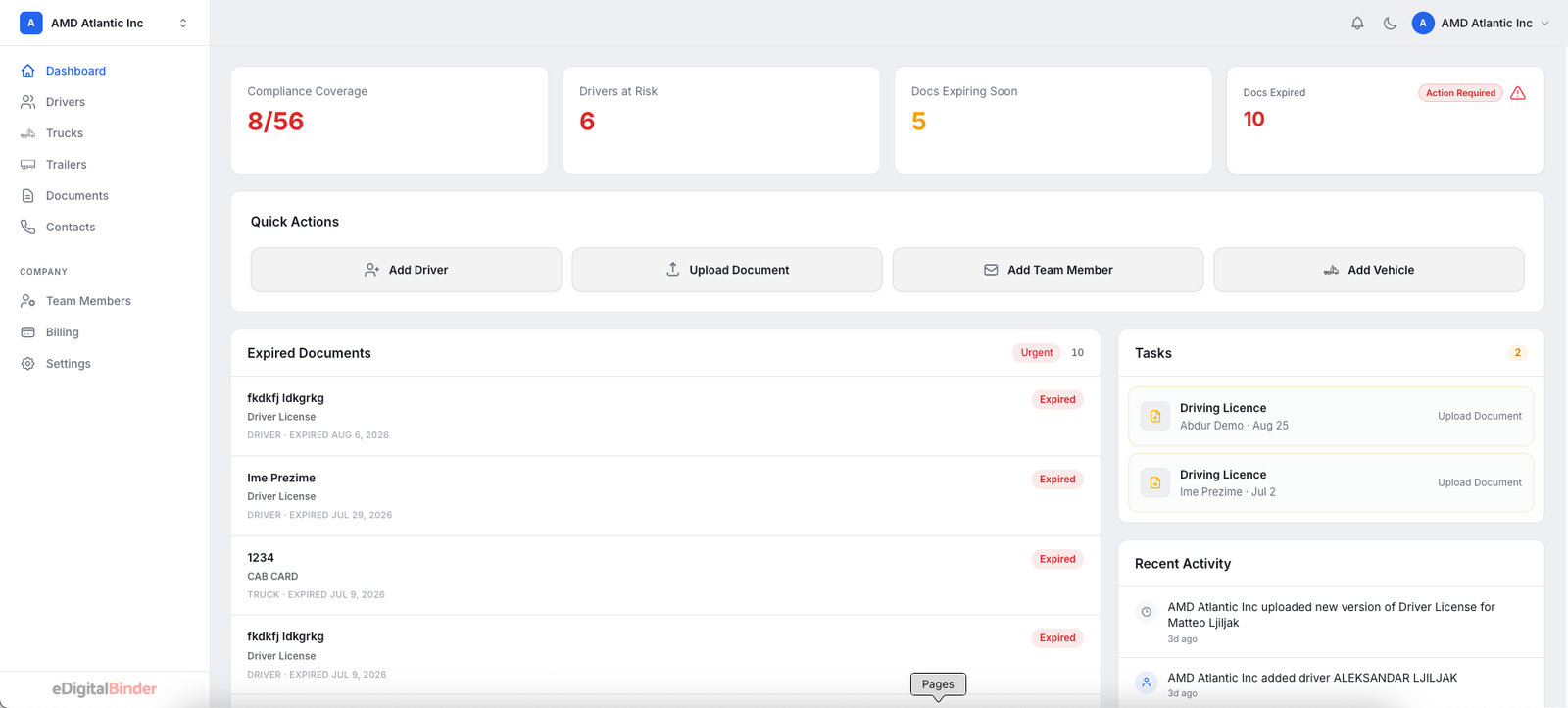
Authorized office users open the dashboard from a web browser, upload complete files, assign them to drivers and vehicles and see which records need attention.
When a document changes, the office replaces it in the same system. The driver app syncs the assigned version when the phone has an internet connection.
Explore fleet document management →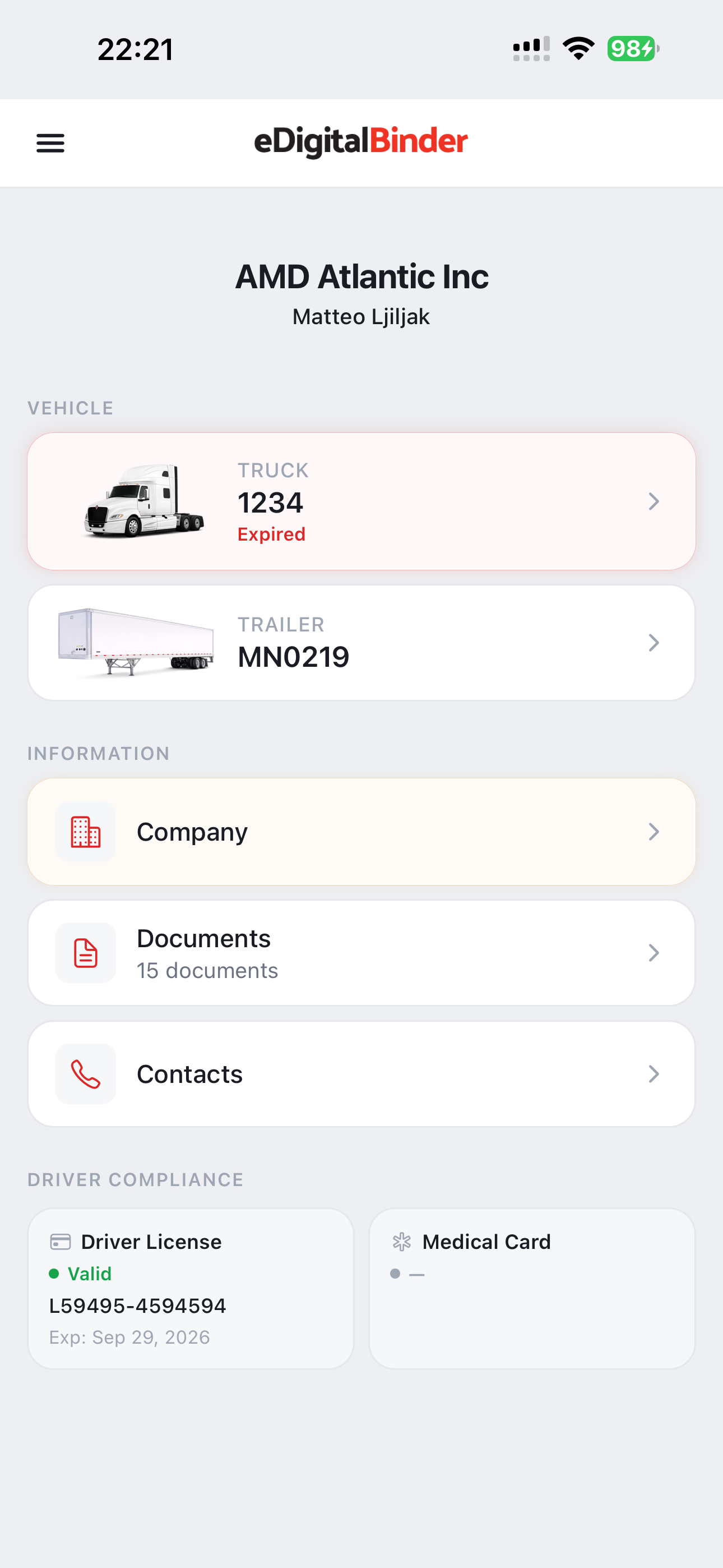
Built for weak signal
Successfully synced documents remain available offline.
Truck routes do not guarantee cellular service. Assigned PDFs and images that successfully download while the phone is online remain in the app’s private storage for offline access.
Drivers should open the app while connected after new or updated files are assigned. If a document has never completed its download, the app identifies that it is not available offline.
Organized around the fleet
Documents connected with the people and equipment using them.
Truck and trailer
Registrations, insurance, permits and inspection records
Driver
Licenses, medical cards and other assigned driver files
Company
Authority, policy and operational documents used across the fleet
Roadside
The current assigned copy a driver may need to display
Paper, folders and a fleet system
What changes when the permit book becomes digital?
| Workflow | Paper binder | Generic cloud folder | eDigitalBinder |
|---|---|---|---|
| Updates | Print and deliver | Replace a shared file | Replace and sync assigned copies |
| Assignment | Stored in each truck | Managed through folders | Connected with drivers and vehicles |
| Offline use | Always physical | Depends on the folder app | Available after a successful sync |
| Expiration view | Manual checks | Manual tracking | Dashboard status and dates |
Faster driver setup
Photograph a license instead of typing every available field.
During driver setup, office staff can photograph a driver license. eDigitalBinder uses OCR to pre-fill available information, then leaves the form with the office for review before saving.
See how driver license OCR works →Roadside context
Electronic documents and the federal rule.
49 CFR 390.32 addresses electronic records and documents covered by federal Parts 300 through 399. Our plain-English guide links directly to the regulation and CVSA roadside-inspection guidance so fleets can read the source material.
Read the 49 CFR 390.32 guide →Frequently asked questions
Digital permit book questions.
What is a digital permit book?+
A digital permit book is software that helps a trucking company organize vehicle, driver and company documents in an office dashboard and make assigned copies available to drivers on a phone or tablet.
How is a digital permit book different from cloud storage?+
A generic cloud folder stores files. A fleet-focused digital permit book connects documents with the appropriate driver, truck or trailer and gives the office visibility into missing or expiring records.
Can eDigitalBinder documents be opened without cellular service?+
Yes. Assigned documents that successfully synced while the phone was online remain available in the driver app when cellular service is unavailable.
Does the office need to install desktop software?+
No. Authorized office users access the eDigitalBinder dashboard through a supported web browser on a connected computer.
Can a fleet organize documents by truck and trailer?+
Yes. The office can organize and assign documents by driver and vehicle so each driver sees the files connected with their work.
Does eDigitalBinder replace a TMS or ELD?+
No. eDigitalBinder is focused on fleet documents. It complements systems used for dispatch, loads, billing, logs or vehicle tracking rather than replacing them.