
Built for the office and the road
Trucking document management software.
Organize fleet documents, assign each copy to the correct driver and vehicle, and see what needs attention from one web dashboard.
Updated September 11, 2026 · eDigitalBinder product team
The operational problem
Documents are managed in the office but used on the road.
Truck documents do not stay in one place. The office receives renewals and replacement files, while drivers need access in another state, at a terminal or during a roadside stop. Generic cloud folders store files, but the fleet still has to decide which copy belongs with which driver, truck and trailer.
eDigitalBinder is focused on that gap. It connects a browser-based office dashboard with an iOS and Android driver app, keeping document organization and delivery in the same workflow.
What fleet document software should make easier.
Central organization
Find records without searching through inboxes.
Keep the document, its identifying information, expiration status and assignment in one system.
Clear ownership
Connect every file with the right equipment.
Assign documents by driver, truck or trailer instead of relying only on folder names.
Expiration visibility
See which document needs attention next.
The dashboard surfaces approaching and passed expiration dates for the office team.
Driver access
Make assigned copies available on the phone.
Drivers use a dedicated app instead of searching old messages or calling the office for a file.
A web dashboard for the fleet office.
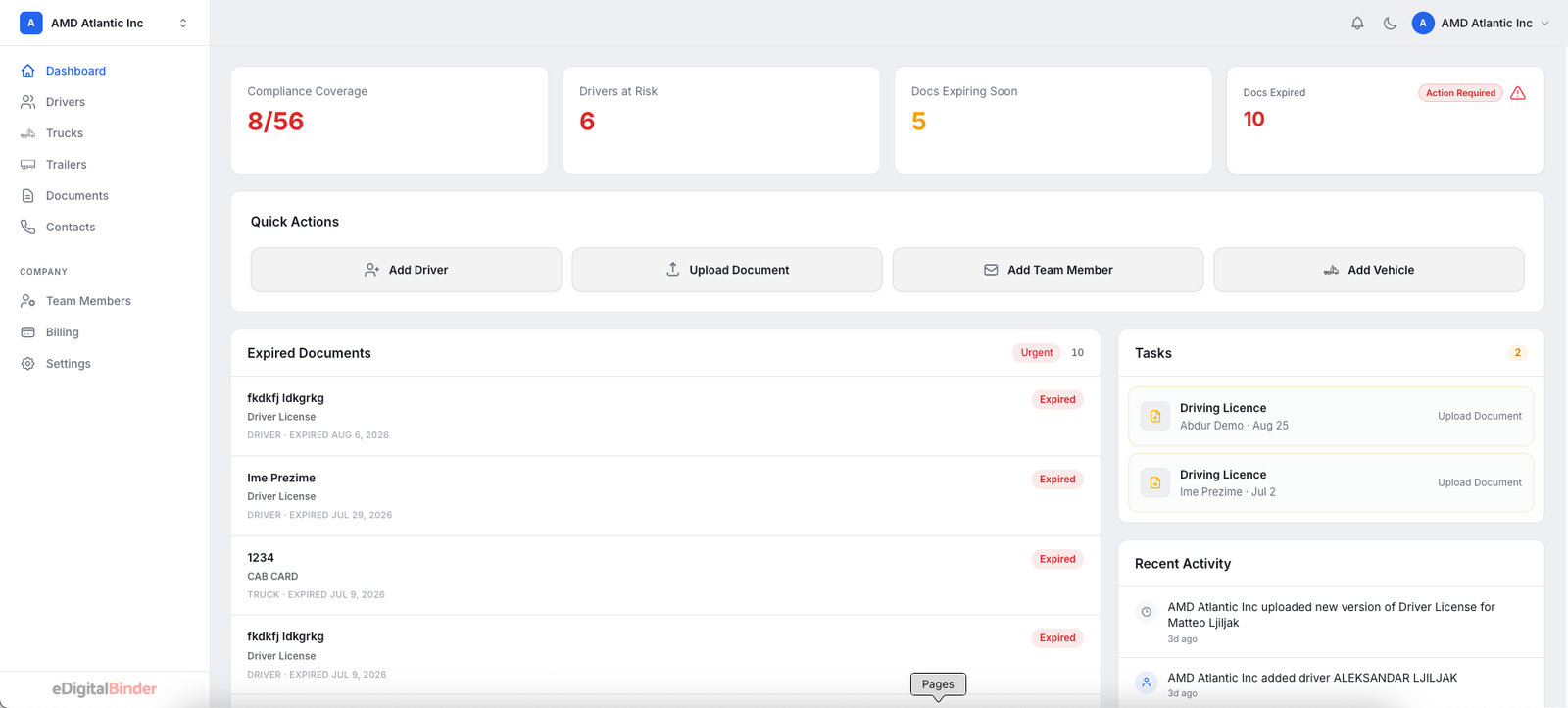
Authorized office and safety staff access eDigitalBinder from a browser. They can add drivers and vehicles, upload documents, make assignments and replace files from any connected computer.
During driver setup, staff can photograph a driver license and let OCR pre-fill available information for review. The dashboard then provides a fleet-level view of missing, expiring and expired records.
A mobile document app for drivers.
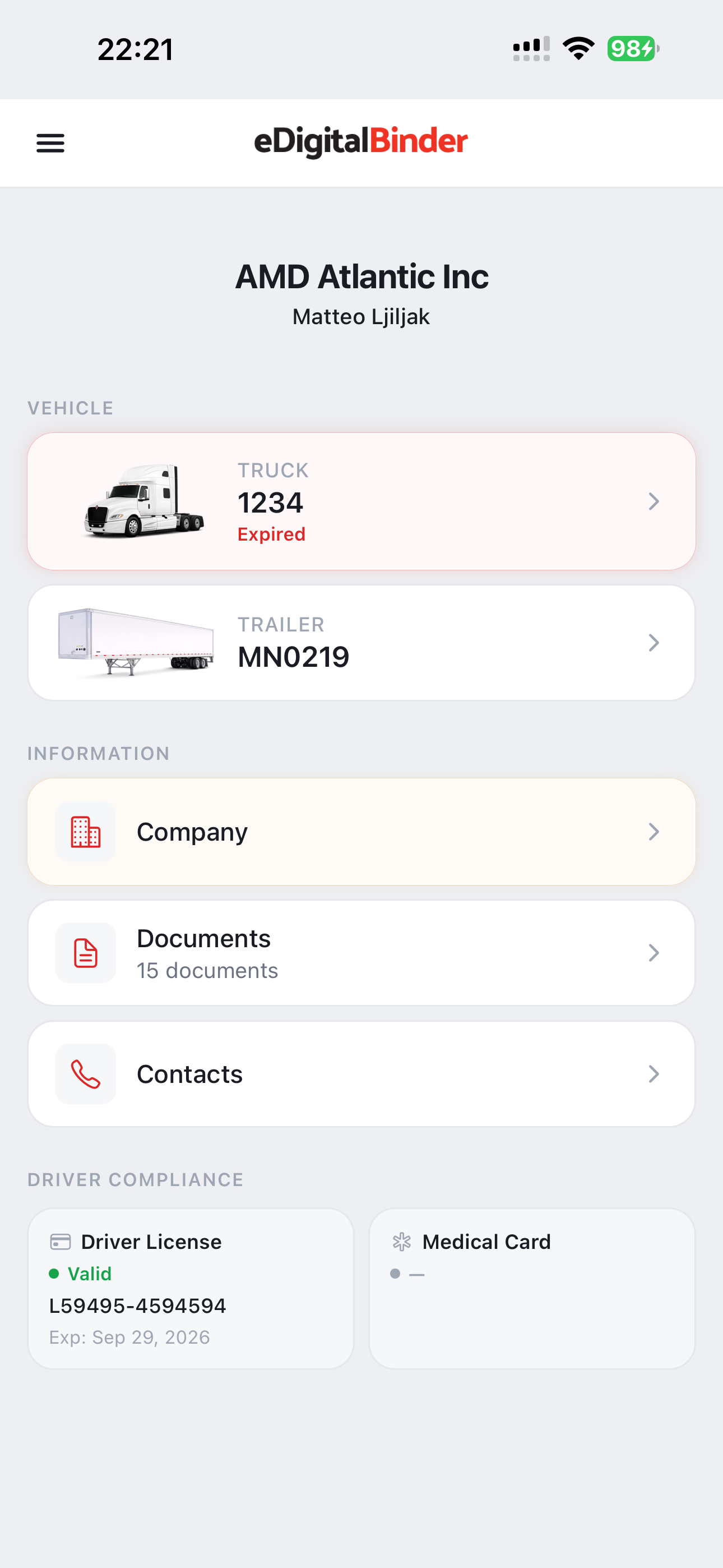
The mobile side is intentionally narrower than the office dashboard. Each driver sees the vehicles and documents assigned to them. Files that successfully download while the phone is online remain available without cellular signal. Drivers should open the app while connected after new versions are assigned.
The app is available for iPhone in the App Store and for Android on Google Play.
How eDigitalBinder fits beside a TMS.
A TMS and a fleet document system solve different operational problems. Dispatch, load planning, billing and settlements belong in the transportation management workflow. eDigitalBinder concentrates on document organization, expiration status, vehicle assignments and driver access.
Keeping that scope focused means a carrier does not have to replace its dispatch system just to improve the way documents move from the office to the truck.
What to check when evaluating a fleet document system.
- 01
Can the office tell which version is current?
Replacing a document should not leave several copies for the driver to interpret.
- 02
Are documents assigned, not merely stored?
A fleet needs to connect files with real drivers and equipment.
- 03
Can the driver find the file quickly?
A document system succeeds only when it works outside the office.
- 04
Is expiration status visible without opening every file?
The office should be able to prioritize its next update from the dashboard.
From office management to offline driver access.
The office-to-driver workflow works because both sides are connected: current files are organized centrally, assigned to the correct people and equipment, and synchronized to the mobile device for use on the road.
Frequently asked questions
Questions about trucking document software.
What is trucking document management software?+
It is software that helps a carrier organize fleet records, connect documents with the correct driver or vehicle, track document status and give authorized users access to the current copy.
Is eDigitalBinder a TMS?+
No. A transportation management system typically manages loads, dispatch and billing. eDigitalBinder is focused on fleet documents and the connection between the office dashboard and driver app.
Can office staff use the dashboard away from the terminal?+
Yes. The eDigitalBinder office dashboard is accessed through a web browser on a connected computer.
Can documents be assigned to trucks and trailers?+
Yes. The office can organize and assign documents by driver and vehicle so drivers see the files connected with their work.
Do driver documents work offline?+
Yes. Assigned documents that successfully downloaded while the phone was online remain available when the phone has no cellular signal.
Can eDigitalBinder read a driver license?+
Yes. Office staff can photograph a driver license and use OCR to pre-fill available driver information for review before saving.